TINS Online Entry Web-Based Training
Introduction
How Do You Know What to Click?
Menu
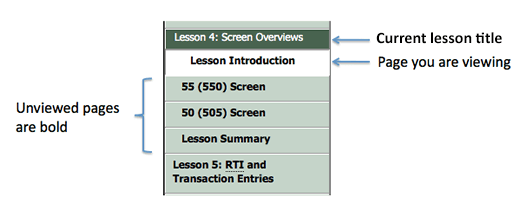
The left navigation menu provides easy access to all areas of the course. Feel free to move around in the course to view or review information. The course exam will be based on all of the information covered, so be sure not to skip anything.
No matter where you are in the course, the current lesson title and name of the page you are viewing are highlighted in the left navigation menu.
Page names you haven’t yet viewed are in bold type.
Next: Link
Each page in the training topic gives you some information and guides you to the next page. You were guided to this page by the Next: link at the bottom of the previous page.
Icons
| This icon … | Means … |
|---|---|

|
Clicking this link will open a new browser window or tab |

|
Clicking this link will open a PDF document |